Applying Composition effects to XAML elements
Backstory
I was exploring XAML's Handoff Visual implementation and how it's created, clipped, wrapped, etc... and found out that the function responsible for creating that visual is CUIElement::EnsureHandOffVisual and when I looked at this function I noticed that it has a bool createLayerVisual parameter
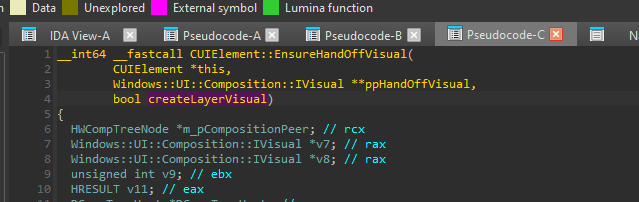
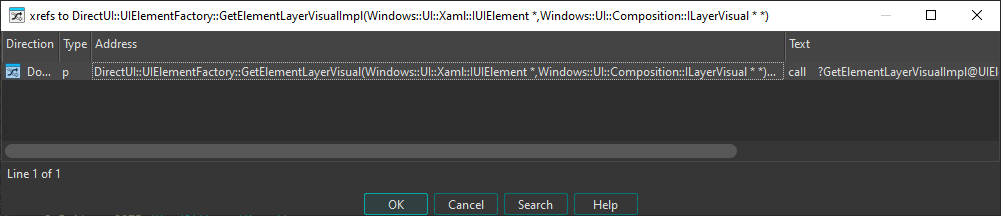
So I looked at the xrefs of this function to see if and when this parameter gets used, and noticed there's a function called CUIElement::GetHandOffLayerVisual in the xrefs

so I was curious and checked the xrefs of it, and found a very interesting function, DirectUI::UIElementFactory::GetElementLayerVisual

Stuff under the DirectUI namespace are usually exposed via interfaces, and that was the case here too!
Xrefs showed that it's exposed through the Windows::UI::Xaml::IUIElementStaticsPrivate interface
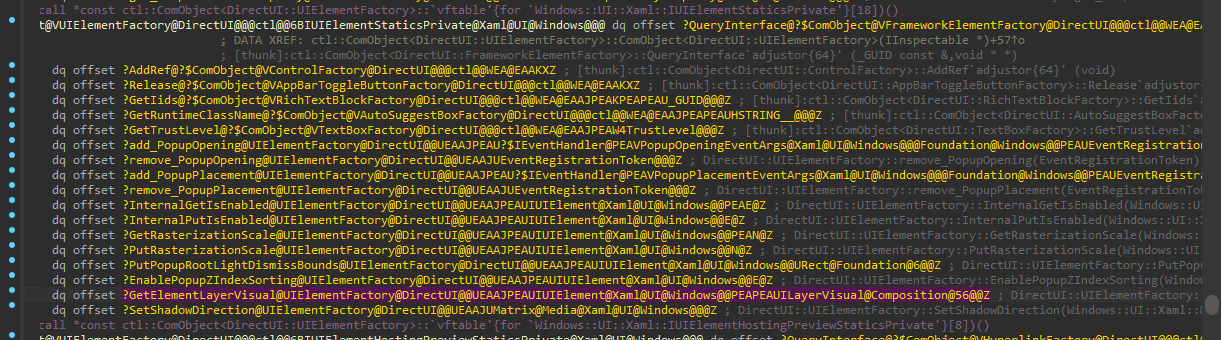
I was curious when this was introduced since I have never seen it before, and after checking multiple Windows.UI.Xaml.dll versions, it turns out that it was introduced in Windows 11 Build 22000.
LayerVisual is a visual type that allows you to apply effects and attach shadows to its child visuals.
Experimentation
Now that we have the interface and the function signature, the only thing missing is the interface IID, checking the UIElementFactory constructor reveals that the interface is stored at offset 0x50 of the factory class object
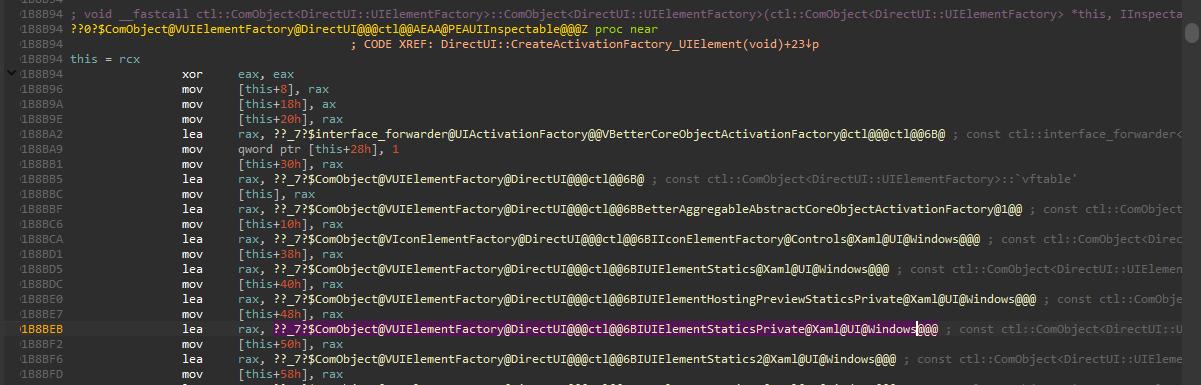
And if we look at the QueryInterface implementation, we can see that it wraps/calls another QueryInterface function but with a pointer to the object at offset 0x10 passed as a this parameter

This means that we are looking for the IID of object returned at offset 0x40 ( 0x50 - 0x10 ) in that wrapped QueryInterface function.
If we look at that function we see that IDA mistyped the this parameter and also wasn't able to detect that it's the this parameter and showed it as a regular register variable
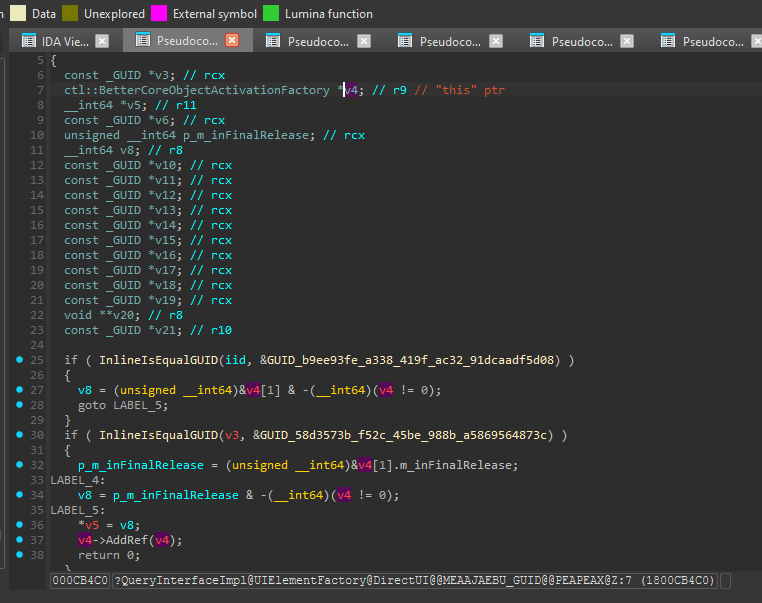
To fix this mess, we will simply change the type of this variable to void*, this way we can see the offsets more clearly, and here we go, we found our IID!
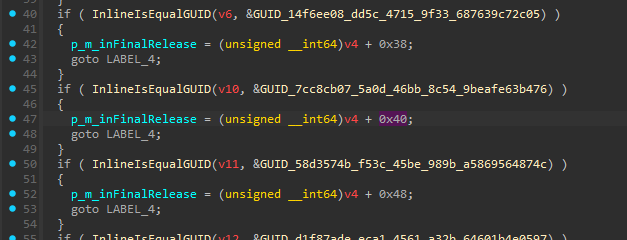
We are using UWP .NET 9 for this experiment so we have to use Source Generated COM to declare this interface definition (technically we can use a projection project or handroll the interface projection codegen too but this is simpler, well, kinda)
[GeneratedComInterface]
[InterfaceType(ComInterfaceType.InterfaceIsIUnknown)]
[Guid("7cc8cb07-5a0d-46bb-8c54-9beafe63b476")]
internal unsafe partial interface IUIElementStaticsPrivate
{
    // IInspectable methods
    void GetIids();
    void GetRuntimeClassName();
    void GetTrustLevel();

    // IUIElementStaticsPrivate methods
    void add_PopupOpening();
    void remove_PopupOpening();
    void add_PopupPlacement();
    void remove_PopupPlacement();
    void InternalGetIsEnabled();
    void InternalPutIsEnabled();
    void GetRasterizationScale();
    void PutRasterizationScale();
    void PutPopupRootLightDismissBounds();
    void EnablePopupZIndexSorting();
    void* GetElementLayerVisual(void* pElement);
}
Now we only need to write some test code and see if it works
<Grid HorizontalAlignment="Stretch" VerticalAlignment="Stretch">
    <StackPanel HorizontalAlignment="Center" VerticalAlignment="Center" Orientation="Vertical">
        <StackPanel Orientation="Horizontal" HorizontalAlignment="Center" VerticalAlignment="Center">
            <ContentControl x:Name="contentControl" HorizontalAlignment="Center" VerticalAlignment="Center">
                <Button Content="Hello, World!" HorizontalAlignment="Center" VerticalAlignment="Center" Margin="50"/>
            </ContentControl>
            <Button x:Name="hiButton" Content="Hello, World!" HorizontalAlignment="Center" VerticalAlignment="Center" Margin="50"/>
        </StackPanel>
        <Button x:Name="playButton" Content="Play Animation" HorizontalAlignment="Center" VerticalAlignment="Center" Margin="20" Click="playButton_Click"/>
    </StackPanel>
</Grid>
private void playButton_Click(object sender, RoutedEventArgs e)
{
// In CsWinRT 3, this probably needs to be changed to something like:
// using var objRef = WindowsRuntimeActivationFactory.GetActivationFactory(typeof(UIElement).FullName, typeof(IUIElementStaticsPrivate).GUID);
// var staticsPrivate = ComInterfaceMarshaller<IUIElementStaticsPrivate>.ConvertToManaged(objRef.GetThisPtrUnsafe());
var staticsPrivate = UIElement.As<IUIElementStaticsPrivate>();
// GetElementLayerVisual expects an IUIElement* but CsWinRT won't give us an IUIElement from a composed class (such as ContentControl) unless
// it's passed to a projected method that takes an UIElement, so we have to QI manually
Marshal.QueryInterface(((IWinRTObject)contentControl).NativeObject.ThisPtr, new("676d0be9-b65c-41c6-ba40-58cf87f201c1") /* IUIElement */, out nint ppv);
var layerVisualPtr = staticsPrivate.GetElementLayerVisual((void*)ppv);
Marshal.Release(ppv);
var layerVisual = LayerVisual.FromAbi((nint)layerVisualPtr);
var compositor = layerVisual.Compositor;
var blur = new GaussianBlurEffect
{
Name = "Blur",
BlurAmount = 0.0f,
BorderMode = EffectBorderMode.Soft,
Optimization = EffectOptimization.Balanced,
Source = new CompositionEffectSourceParameter("source")
};
var effectFactory = compositor.CreateEffectFactory(blur, new[] { "Blur.BlurAmount" });
var effectBrush = effectFactory.CreateBrush();
layerVisual.Effect = effectBrush;
var easing = CompositionEasingFunction.CreateExponentialEasingFunction(compositor, CompositionEasingFunctionMode.InOut, 6);
var animation = compositor.CreateScalarKeyFrameAnimation();
animation.InsertKeyFrame(0.0f, 0.0f, easing);
animation.InsertKeyFrame(1.0f, 10.0f, easing);
animation.Duration = TimeSpan.FromSeconds(2);
animation.IterationBehavior = AnimationIterationBehavior.Forever;
animation.Direction = AnimationDirection.Alternate;
effectBrush.StartAnimation("Blur.BlurAmount", animation);
Marshal.QueryInterface(((IWinRTObject)hiButton).NativeObject.ThisPtr, new("676d0be9-b65c-41c6-ba40-58cf87f201c1") /* IUIElement */, out nint ppv2);
var layerVisual2Ptr = staticsPrivate.GetElementLayerVisual((void*)ppv2);
Marshal.Release(ppv2);
var layerVisual2 = LayerVisual.FromAbi((nint)layerVisual2Ptr);
var alphaMask = new AlphaMaskEffect
{
Name = "AlphaMask",
Source = new CompositionEffectSourceParameter("source"),
AlphaMask = new CompositionEffectSourceParameter("mask")
};
var gradientBrush = compositor.CreateLinearGradientBrush();
gradientBrush.StartPoint = new(0, 0);
gradientBrush.EndPoint = new(1, 0);
gradientBrush.MappingMode = CompositionMappingMode.Relative;
CompositionColorGradientStop stop;
gradientBrush.ColorStops.Add(compositor.CreateColorGradientStop(-1.0f, Colors.Black));
gradientBrush.ColorStops.Add(stop = compositor.CreateColorGradientStop(1.0f, Colors.Black));
gradientBrush.ColorStops.Add(compositor.CreateColorGradientStop(1.0f, Colors.Transparent));
var easing2 = CompositionEasingFunction.CreatePowerEasingFunction(compositor, CompositionEasingFunctionMode.InOut, 3);
var animation2 = compositor.CreateScalarKeyFrameAnimation();
animation2.InsertKeyFrame(0.0f, 1.0f, easing2);
animation2.InsertKeyFrame(1.0f, -1.0f, easing2);
animation2.Duration = TimeSpan.FromSeconds(2);
animation2.IterationBehavior = AnimationIterationBehavior.Forever;
animation2.Direction = AnimationDirection.Alternate;
stop.StartAnimation("Offset", animation2);
var effectFactory2 = compositor.CreateEffectFactory(alphaMask);
var effectBrush2 = effectFactory2.CreateBrush();
effectBrush2.SetSourceParameter("mask", gradientBrush);
layerVisual2.Effect = effectBrush2;
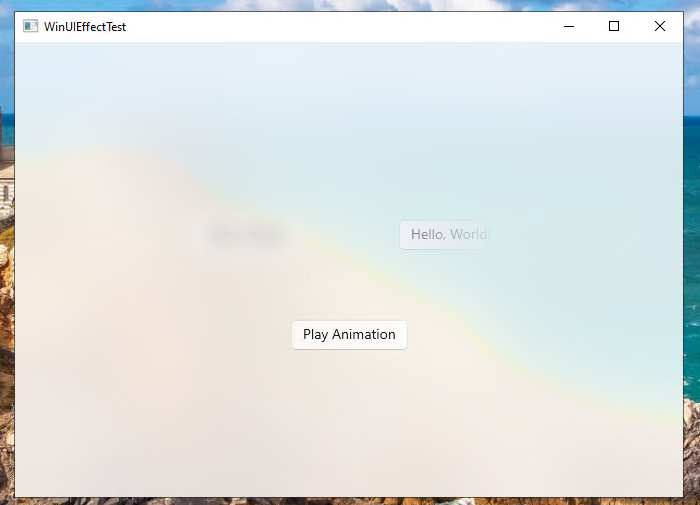
}And voila!
GetElementLayerVisual has to be called before any handoff visual was created for the element, so if ElementCompositionPreview.GetElementVisual was called on the element prior it, the function will fail.
But what about Windows 10?
This function we just used doesn't exist in the Windows 10 version of that interface, but looking at how createLayerVisual is used inside CUIElement::EnsureHandOffVisual we can see that the LayerVisual and the normal visual paths are very similar, so similar that we can hook IDCompositionDevice2::CreateVisual and redirect it to Windows.UI.Compositor.CreateLayerVisual and it will just work
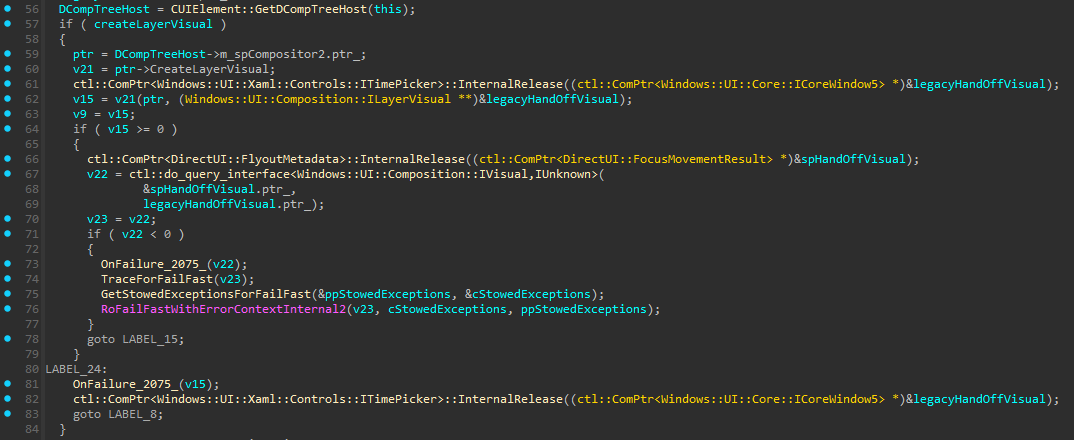
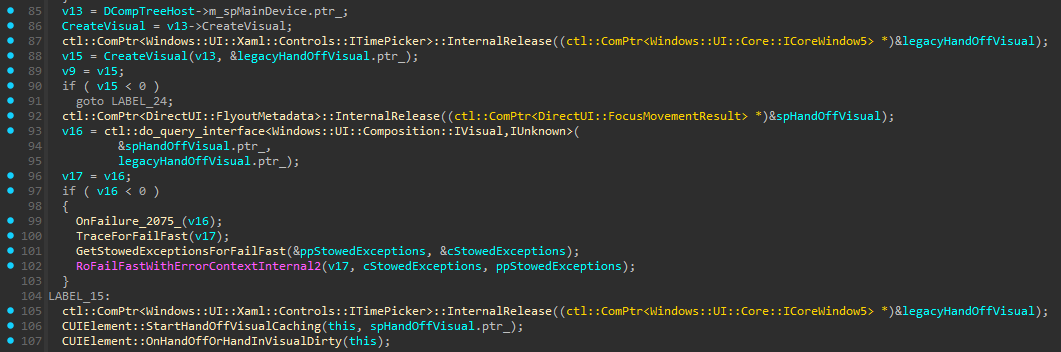
We will be using a C++/WinRT Runtime Component for this since we are gonna need Detours, and using Detours in C# is a bit harder than using it from C++ directly.
So let's create a simple WinRT helper static class for this, lets start with the IDL
namespace XamlCompositionHelpers
{
    static runtimeclass ElementCompositionPreviewEx
    {
        static Windows.UI.Composition.LayerVisual GetElementLayerVisual(Windows.UI.Xaml.UIElement element);
    }
}
And now the implementation
namespace winrt::XamlCompositionHelpers::implementation
{
    bool ElementCompositionPreviewEx::s_Hooked = false;
    DWORD ElementCompositionPreviewEx::s_ThreadId = NULL;
    std::mutex ElementCompositionPreviewEx::s_Mutex = { };
    decltype(ElementCompositionPreviewEx::s_CreateVisual) ElementCompositionPreviewEx::s_CreateVisual = nullptr;

    static bool IsOnWindows11OrHigher()
    {
        bool isWin11 = ApiInformation::IsApiContractPresent(L"Windows.Foundation.UniversalApiContract", 14);
        return isWin11;
    }

    LayerVisual ElementCompositionPreviewEx::GetElementLayerVisual(UIElement const& element)
    {
        // On Windows 11 b22000 and higher, we can use the IUIElementStaticsPrivate interface to get the LayerVisual directly
        com_ptr<IUIElementStaticsPrivate> uiElementPrivate;
        if (IsOnWindows11OrHigher() && (uiElementPrivate = try_get_activation_factory<UIElement, IUIElementStaticsPrivate>()))
        {
            LayerVisual layerVisual { nullptr };
            check_hresult(uiElementPrivate->GetElementLayerVisual(winrt::get_abi(element), put_abi(layerVisual)));
            return layerVisual;
        }

        // We are using the thread ID to verify and ensure that we aren't hoking any other ElementCompositionPreview::GetElementVisual call
        // that happened to be going in another thread at the same time we are hooking the function to return a LayerVisual,
        // and we use a lock to ensure that only one thread can be hooking at a time so that thread ID doesn't get changed mid-hook.
        std::scoped_lock lock(s_Mutex);
        EnsureHooked();

        s_ThreadId = GetCurrentThreadId();
        auto visual = ElementCompositionPreview::GetElementVisual(element);
        s_ThreadId = NULL;
        return visual.as<LayerVisual>();
    }

    void ElementCompositionPreviewEx::EnsureHooked()
    {
        if (!s_Hooked)
        {
            // assuming we are on the UI thread, it wouldn't work otherwise anyway
            auto compositor = Window::Current().Compositor();
            auto device3 = compositor.as<IDCompositionDevice3>();
            auto vtbl = *reinterpret_cast<void***>(device3.get());
            s_CreateVisual = reinterpret_cast<decltype(s_CreateVisual)>(vtbl[6]);

            DetourTransactionBegin();
            DetourUpdateThread(GetCurrentThread());
            DetourAttach(&(PVOID&)s_CreateVisual, &ElementCompositionPreviewEx::CreateVisualHook);
            check_win32(DetourTransactionCommit());
            s_Hooked = true;
        }
    }

    HRESULT WINAPI ElementCompositionPreviewEx::CreateVisualHook(IDCompositionDevice2* pThis, IDCompositionVisual2** ppVisual)
    {
        // Ensure that we are only hooking our own calls to ElementCompositionPreview::GetElementVisual / IDCompositionDevice2::CreateVisual
        if (s_ThreadId != GetCurrentThreadId())
            return s_CreateVisual(pThis, ppVisual);

        Compositor compositor { nullptr };
        copy_from_abi(compositor, pThis);

        LayerVisual layerVisual = compositor.CreateLayerVisual();
        copy_to_abi(layerVisual, *(void**&)ppVisual);

        return S_OK;
    }
}
And with this we can then replace our C# code with this
private void playButton_Click(object sender, RoutedEventArgs e)
{
    var layerVisual = ElementCompositionPreviewEx.GetElementLayerVisual(contentControl);
    var compositor = layerVisual.Compositor;

    var blur = new GaussianBlurEffect
    {
        Name = "Blur",
        BlurAmount = 0.0f,
        BorderMode = EffectBorderMode.Soft,
        Optimization = EffectOptimization.Balanced,
        Source = new CompositionEffectSourceParameter("source")
    };

    var effectFactory = compositor.CreateEffectFactory(blur, new[] { "Blur.BlurAmount" });
    var effectBrush = effectFactory.CreateBrush();
    layerVisual.Effect = effectBrush;

    var easing = CompositionEasingFunctionEx.CreateExponentialEasingFunction(compositor, CompositionEasingFunctionMode.InOut, 6);

    var animation = compositor.CreateScalarKeyFrameAnimation();
    animation.InsertKeyFrame(0.0f, 0.0f, easing);
    animation.InsertKeyFrame(1.0f, 10.0f, easing);
    animation.Duration = TimeSpan.FromSeconds(2);
    animation.IterationBehavior = AnimationIterationBehavior.Forever;
    animation.Direction = AnimationDirection.Alternate;
    effectBrush.StartAnimation("Blur.BlurAmount", animation);

    var layerVisual2 = ElementCompositionPreviewEx.GetElementLayerVisual(hiButton);

    var alphaMask = new AlphaMaskEffect
    {
        Name = "AlphaMask",
        Source = new CompositionEffectSourceParameter("source"),
        AlphaMask = new CompositionEffectSourceParameter("mask")
    };

    var gradientBrush = compositor.CreateLinearGradientBrush();
    gradientBrush.StartPoint = new(0, 0);
    gradientBrush.EndPoint = new(1, 0);
    gradientBrush.MappingMode = CompositionMappingMode.Relative;

    CompositionColorGradientStop stop;
    gradientBrush.ColorStops.Add(compositor.CreateColorGradientStop(-1.0f, Colors.Black));
    gradientBrush.ColorStops.Add(stop = compositor.CreateColorGradientStop(1.0f, Colors.Black));
    gradientBrush.ColorStops.Add(compositor.CreateColorGradientStop(1.0f, Colors.Transparent));

    var easing2 = CompositionEasingFunctionEx.CreatePowerEasingFunction(compositor, CompositionEasingFunctionMode.InOut, 3);

    var animation2 = compositor.CreateScalarKeyFrameAnimation();
    animation2.InsertKeyFrame(0.0f, 1.0f, easing2);
    animation2.InsertKeyFrame(1.0f, -1.0f, easing2);
    animation2.Duration = TimeSpan.FromSeconds(2);
    animation2.IterationBehavior = AnimationIterationBehavior.Forever;
    animation2.Direction = AnimationDirection.Alternate;
    stop.StartAnimation("Offset", animation2);

    var effectFactory2 = compositor.CreateEffectFactory(alphaMask);
    var effectBrush2 = effectFactory2.CreateBrush();
    effectBrush2.SetSourceParameter("mask", gradientBrush);
    layerVisual2.Effect = effectBrush2;
}
And voila!
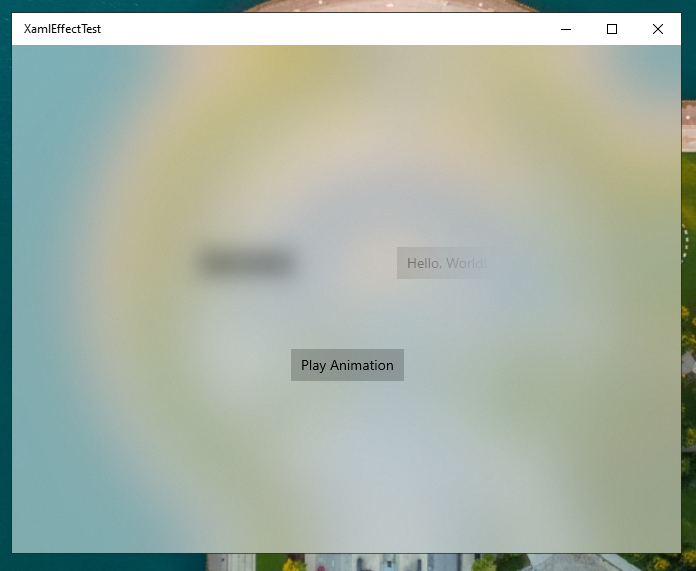
As you might have noticed I'm using CompositionEasingFunctionEx instead of CompositionEasingFunction to create easing functions in the Windows 10 code, that's because the latter only got the support for creating easing functions in Windows 11, so I created a CompositionEasingFunctionEx helper class to allow creating such easing functions under Windows 10, but that's a story for another article.
But what about WinUI 3?
Unfortunately WinUI 3 doesn't have that interface method at all, neither in latest version or older ones, BUT we can use the same trick we used for Windows 10, so lets take a look at the CUIElement::EnsureHandOffVisual function in WinUI 3
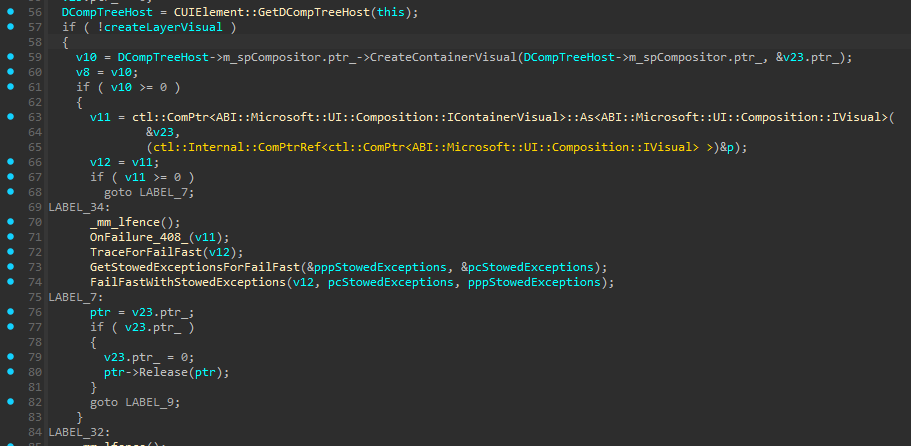
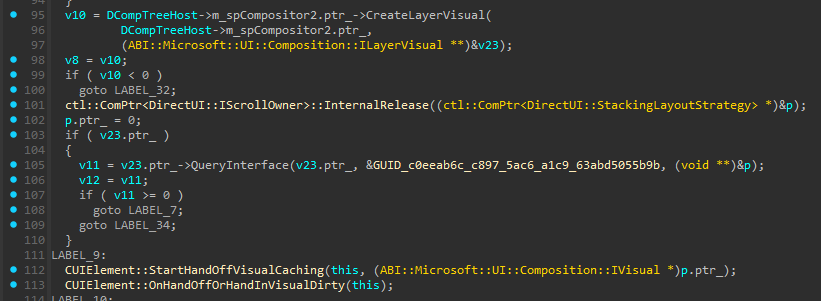
Interesting, so it uses the WinRT Microsoft.UI.Composition API for both cases, so we need to copy the C++ implementation code we wrote before and make few changes to accommodate that (previous comments are omitted, so check them in the UWP/WUX code if you haven't)
namespace winrt::WinUICompositionHelpers::implementation
{
    bool ElementCompositionPreviewEx::s_Hooked = false;
    DWORD ElementCompositionPreviewEx::s_ThreadId = NULL;
    std::mutex ElementCompositionPreviewEx::s_Mutex = { };
    decltype(ElementCompositionPreviewEx::s_CreateContainerVisual) ElementCompositionPreviewEx::s_CreateContainerVisual = nullptr;

    LayerVisual ElementCompositionPreviewEx::GetElementLayerVisual(UIElement const& element)
    {
        std::scoped_lock lock(s_Mutex);
        assert(element.DispatcherQueue().HasThreadAccess());
        EnsureHooked(CompositionTarget::GetCompositorForCurrentThread());

        s_ThreadId = GetCurrentThreadId();
        auto visual = ElementCompositionPreview::GetElementVisual(element);
        s_ThreadId = NULL;
        return visual.as<LayerVisual>();
    }

    void ElementCompositionPreviewEx::EnsureHooked(Compositor compositor)
    {
        if (!s_Hooked)
        {
            auto vtbl = *reinterpret_cast<void***>(winrt::get_abi(compositor));
            s_CreateContainerVisual = reinterpret_cast<decltype(s_CreateContainerVisual)>(vtbl[9]);

            DetourTransactionBegin();
            DetourUpdateThread(GetCurrentThread());
            DetourAttach(&(PVOID&)s_CreateContainerVisual, &ElementCompositionPreviewEx::CreateContainerVisualHook);
            check_win32(DetourTransactionCommit());
            s_Hooked = true;
        }
    }

    HRESULT WINAPI ElementCompositionPreviewEx::CreateContainerVisualHook(void* pThis, void** ppVisual)
    {
        if (s_ThreadId != GetCurrentThreadId())
            return s_CreateContainerVisual(pThis, ppVisual);

        Compositor compositor { nullptr };
        copy_from_abi(compositor, pThis);

        LayerVisual layerVisual = compositor.CreateLayerVisual();
        copy_to_abi(layerVisual, *(void**&)ppVisual);

        return S_OK;
    }
}
The C# code is the same as UWP/WUX version, so no need to include it again, and with that in place.... voila!
And that's it, see you in the next article!
Special thanks to Dongle for proofreading the article
Comments